Everything you need to turn Meta ads into sales
Create the ad, launch it, see who bought and fix what isn't working. Six tools that work as one, built for businesses that sell on WhatsApp and the web.
- 01AI Ad LaunchAI
Go from idea to a live Meta ad in one conversation
- 02AI Creative StudioAI
Studio-quality ad images without a designer
- 03Sales & Lead Tracking
See which ads made you money, not just clicks
- 04AI Autopilot & OptimizationAI
An ad partner that watches your campaigns around the clock
- 05AI Landing Page BuilderAI
A page that sells, built while you chat
- 06Creative AnalysisAI
Know what's wrong with an ad before you spend on it
Go from idea to a live Meta ad in one conversation
Tell Tenzu what you sell, in your own words, or paste your website link or a product photo. The AI drafts your audience, writes the ad and builds the creative, then launches it to Facebook and Instagram when you say so.
- 1Describe your product, paste a link or upload a photo
- 2Review the audience, copy and creative Tenzu drafts
- 3Set a daily budget in your currency and launch
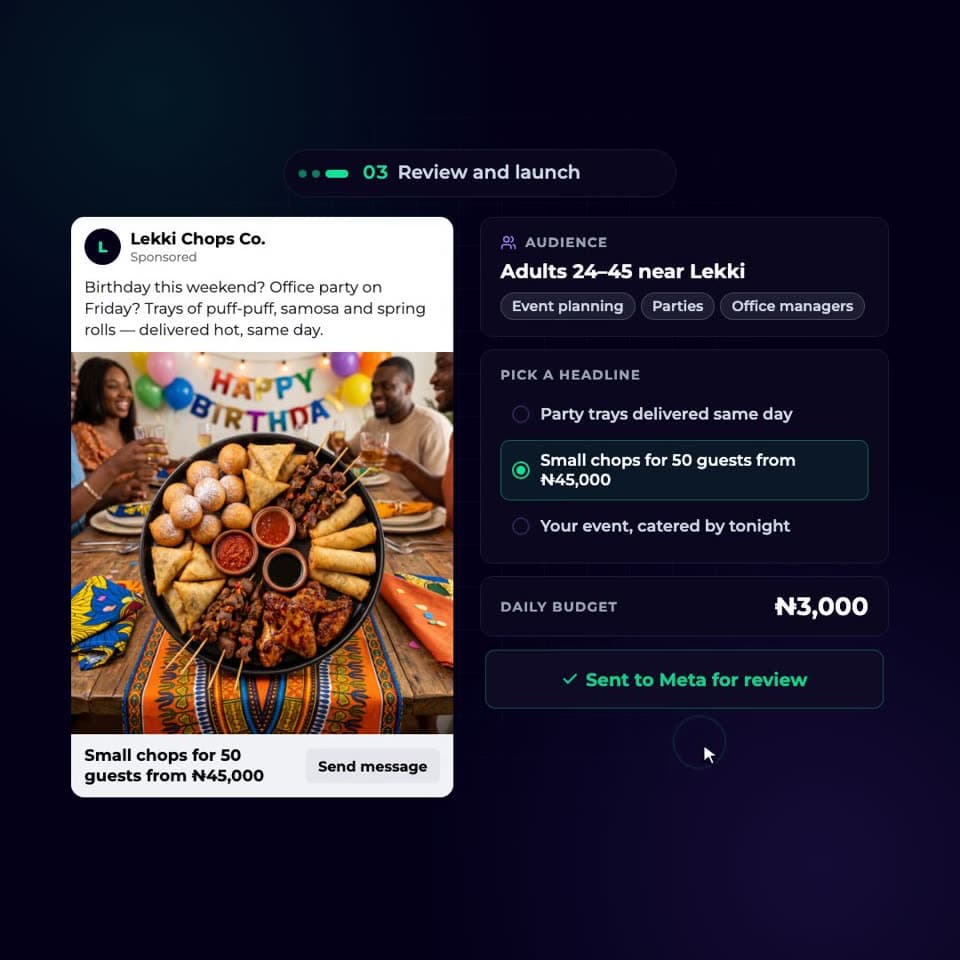
Launch by chat
No 50-setting forms. Answer a few plain questions and the campaign is built for you.
Start from a URL or a photo
Tenzu reads your website or product image and pulls out what makes it sell.
Audience that fits
Advantage+ when you want Meta to decide, or cities, languages, interests and job titles when you don't.
Policy check before launch
TenzuGuard flags copy Meta is likely to reject, so ads don't get stuck in review.
Sales, leads or app installs
Pick the goal. Lead ads come with a drag-and-drop Instant Form builder.
Copy written for you
Headline, primary text and button, in your brand's voice. Copy never costs credits.
Studio-quality ad images without a designer
Turn a phone photo into a scroll-stopping ad, or start from a single line of text. Pick from four frontier image models, guide them with your own reference images, and get every common Meta size.
- 1Upload your product or describe the ad you want
- 2Choose a style and a model, or let Tenzu pick
- 3Refine, resize and send it straight to a campaign
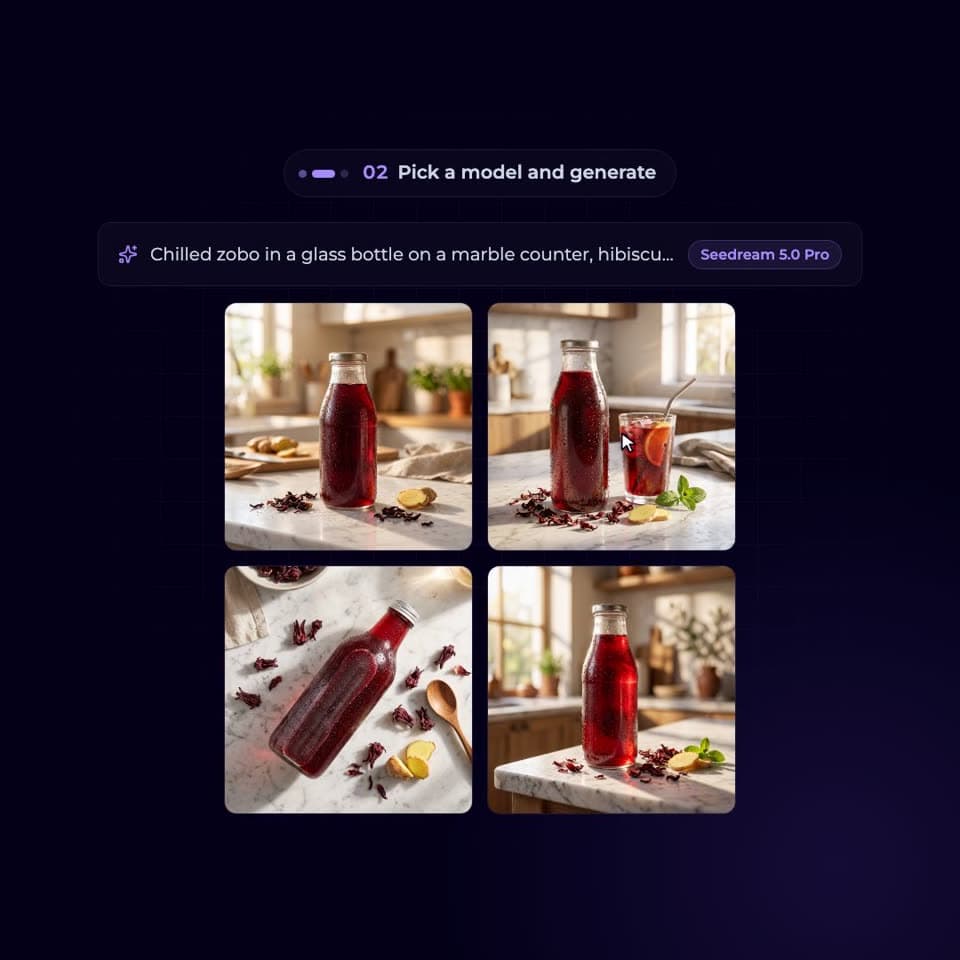
Four image models
Nano Banana 2, GPT Image 2, Seedream 5.0 Pro and Grok Imagine 2.0, on every plan.
Your product, restaged
Reference images keep your real product while the AI builds the scene around it.
Templates and styles
Start from proven ad layouts and swap in your own photos and text.
Edit without starting over
Refine one detail, keep the rest. Edits never squash or stretch your image.
Every placement size
Square, portrait and landscape versions for Feed, Stories and Reels.
Copy variations
Generate fresh headlines and captions that match your business context.
See which ads made you money, not just clicks
Every Tenzu ad is wrapped in a smart link that follows people from the ad to your WhatsApp or website. Record a sale in one tap, or let the pixel and Conversions API do it for you, and see spend against revenue in your own currency.
- 1Launch with a smart link, added automatically
- 2Mark WhatsApp sales as sold, or track website orders
- 3Compare what you spent with what you made
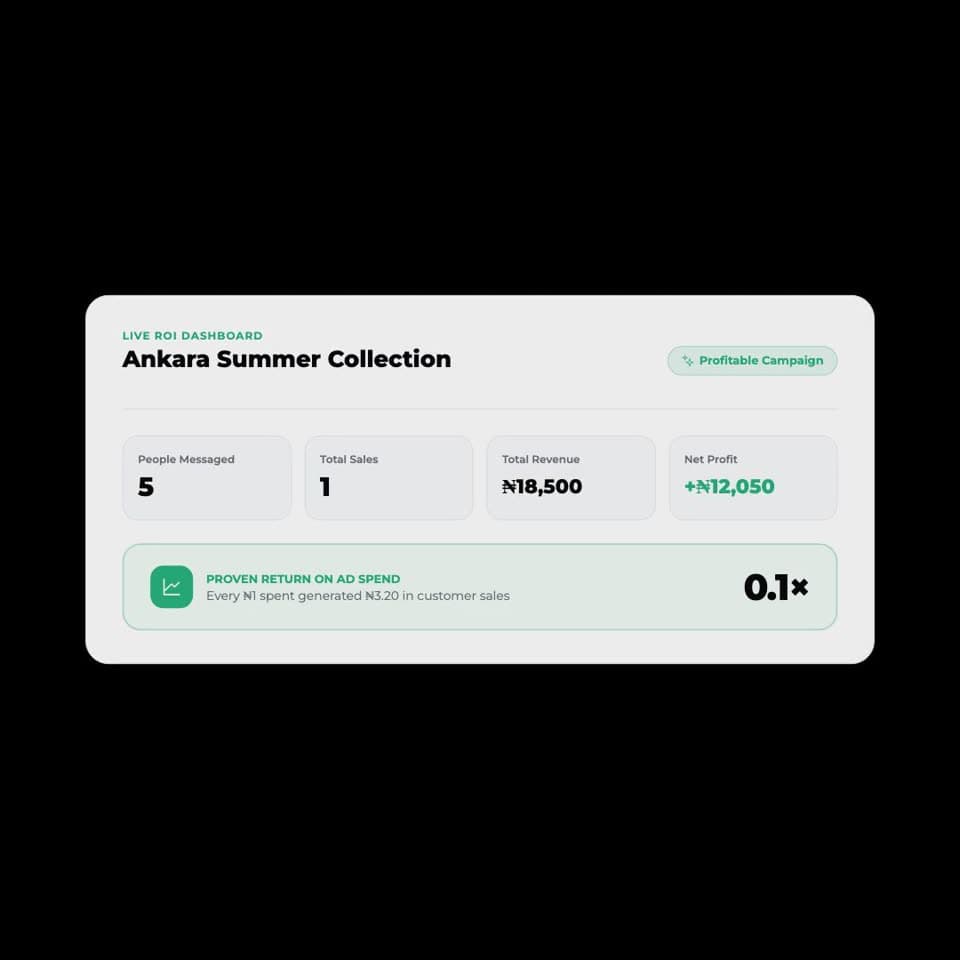
WhatsApp attribution
Know how many people messaged from each ad, not just how many saw it.
Record sales
Log a sale closed in a chat in seconds. It joins your orders and counts toward the ad that brought it.
Pixel and Conversions API
Website purchases are sent back to Meta, so it finds more buyers like them.
Plain-language dashboard
People reached, people who messaged, cost per chat and revenue, by channel.
Leads hub
Every Instant Form lead in one place, with CSV export for your team.
Account health
Payment issues, expired connections and disabled accounts surface before they cost you.
An ad partner that watches your campaigns around the clock
Tenzu checks every campaign, ad set and ad for wasted spend, tired creatives and audiences that have gone quiet. You get a clear fix you can apply in one click, talk through with Ask Sera, or hand to Autopilot.
- 1Tenzu scans your ads and flags what needs attention
- 2Apply a one-click fix or ask Sera to walk you through it
- 3Roll back any change if the results dip
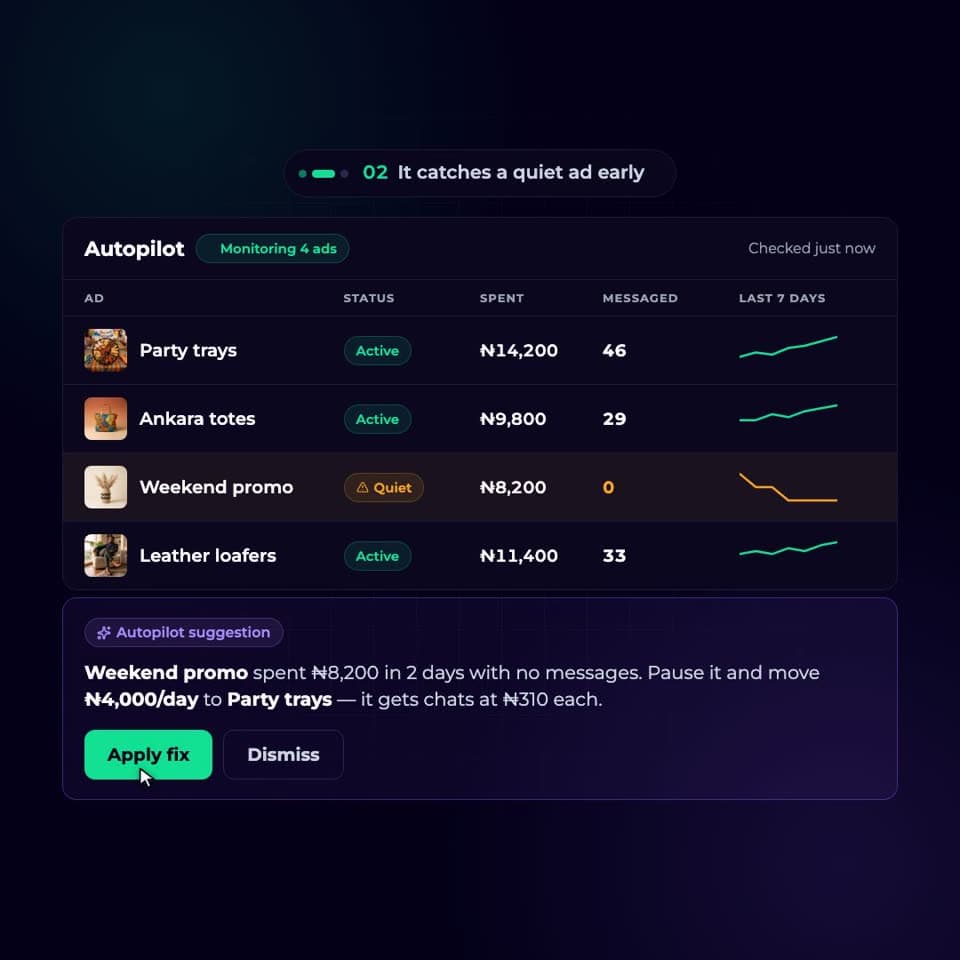
Quiet-ad alerts
Get told when an ad stops bringing chats, by email or on WhatsApp.
One-click fixes
Pause a loser or scale a winner's budget without opening Ads Manager.
Ask Sera
Ask why an ad is struggling and get an answer grounded in your own numbers.
Before-and-after previews
See exactly what changes, like "Age 24–45 → 18–65", before anything goes to Meta.
Version history and rollback
Every AI change is saved. Restore the previous targeting or creative any time.
Guardrails built in
A cooldown after targeting changes keeps Meta's learning phase from resetting.
A page that sells, built while you chat
Describe your offer and Tenzu builds a fast, mobile-first landing page with your products, brand colours and checkout. Edit by chat or click any section to change it, then publish to your own Tenzu link.
- 1Tell the AI what the page is for
- 2Edit blocks by chat or directly in the Studio
- 3Publish and point your ads at it
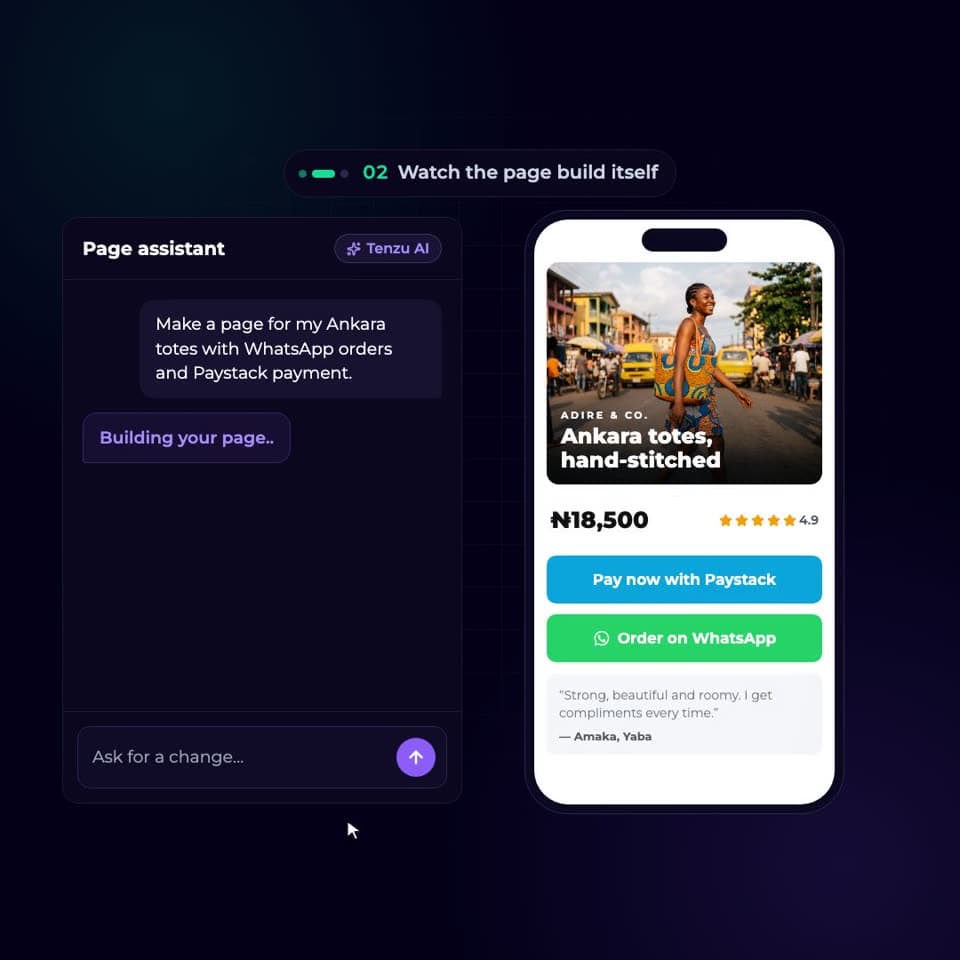
Generated, then yours
Hero, products, reviews, FAQ and more, as blocks you can reorder and restyle.
Multi-product cart
Shoppers add several items and check out on WhatsApp or pay online.
Online payments
Take card, bank transfer and USSD payments through Paystack.
Tracking switched on
Views and checkouts are sent to Meta automatically. No code to paste.
Brand style guide
Set your colours and fonts once and every section follows them.
Built for phones
Most of your buyers are on mobile, so every page is designed for it first.
Know what's wrong with an ad before you spend on it
Tenzu's AI reviews your creatives the way a senior media buyer would, flagging rejection risks, weak contrast and wrong sizes, and pointing out what to try next. Then it lines those issues up against real performance.
- 1Pick a creative from your library or a live ad
- 2Get red flags, warnings and opportunities
- 3Fix it in the editor and relaunch
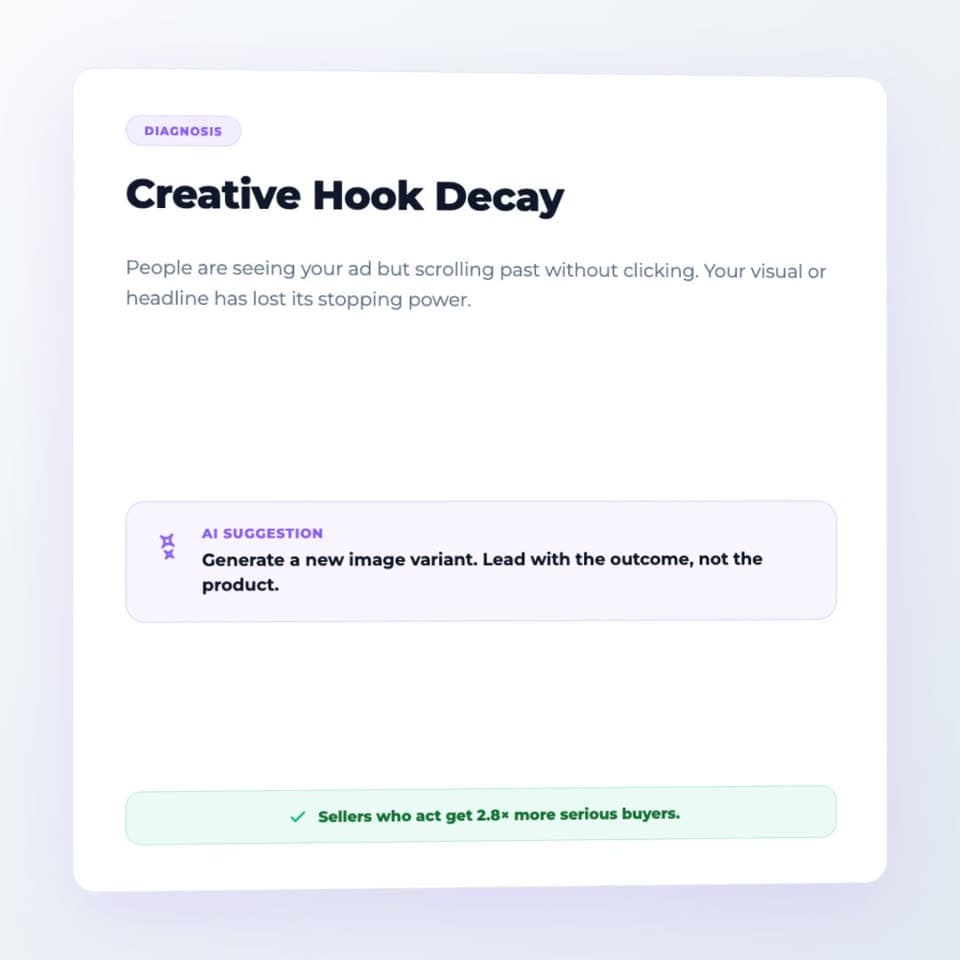
AI creative review
Every image scanned for the issues that quietly kill results.
Rejection risks
Content Meta is likely to block is caught before you submit it.
Tied to performance
See spend, reach and clicks next to the issues found on each ad.
Made for African businesses, not adapted for them
Global ad tools assume a USD card and a website checkout. Tenzu starts from how your customers actually buy.
Pay with your local card
Subscribe through Paystack with debit card, bank transfer or USSD. No failed USD charges.
Numbers in your currency
Budgets, spend and revenue shown in your own currency, with a heads-up if your Meta account bills in another.
WhatsApp-first
Built for businesses that close sales in chat, with alerts that reach you on WhatsApp.
Nine markets at launch
Nigeria, South Africa, Ghana, Kenya, Uganda, Tanzania, Rwanda, Cameroon and Senegal.
Agency results without the agency
How Tenzu compares to running ads yourself in Ads Manager or paying someone to do it.
| Feature | Tenzu | Ads Manager | Agency |
|---|---|---|---|
| Time to launch an ad | Minutes, by chat | Hours of setup | Days to weeks |
| AI ad images and copy | Yes | No | Extra fee |
| Tracks WhatsApp sales | Yes | No | No |
| Results in plain language | Yes | No | PDF reports |
| 24/7 monitoring and fixes | Yes | No | Business hours |
| Landing pages with checkout | Yes | No | Extra fee |
| You stay in control | Yes | Yes | No |
Try every feature free for 7 days
Connect your Meta ad account and launch your first ad today. No card required to start.